
Collection type: python list#
Creating a python list#
A literal python list is created by surrounding a collection of comma (,) separated items with square brackets []. An example:
[1, 2, 3]
[1, 2, 3]
A python list can be heterogeneous. In other words, it can contain values of different types:
[1, 1.5, "word"]
[1, 1.5, 'word']
As usual, you can assign a list to a variable, and the list defined on the RHS can contain variables, which will be evaluated when the list is created:
x = 7.5
a_list = [x, x + 3]
print(a_list)
[7.5, 10.5]
Extracting elements#
To extract a single element from a python list, use the square bracket [] with an integer indicating the index of the element. In python, the index starts with 0 from the left and increment as you goes to the right. Example:
x = [1, 7, 5, 4, 2, 9]
# Extract the first element (index = 0)
x[0]
1
# Extract the fifth element (index = 4)
x[4]
2
You can also extract element using negative index, which counts from the right starting -1:
# Extract the last element
x[-1]
9
# Extract the third element, counting from the right
x[-3]
4
Subsetting via slices#
To subset a list (which produces another list), use the slice object of the form start:stop or start:stop:step. Notice that in python the selection is right endpoint exclusive:
x = [1, 7, 5, 4, 2, 9]
# extract elements at indices 0 through 1
x[0:2]
[1, 7]
# extract elements from index -3 through index -2
x[-3:-1]
[4, 2]
Note that the length of a python list is conveniently given by the len():
len(x)
6
And so, to extract the last three elements (including the last one):
x[-3:len(x)]
[4, 2, 9]
So far we’ve only used the start:stop version of the slicing object. Here is an example of the start:stop:step version, where we skip a number every time we make a step:
x[0:len(x):2]
[1, 5, 2]
Finally, we can omit a starting index of if we want to start from the first element, and we can omit the ending index if we want stop at the last element. So the above line is equivalent to:
x[::2]
[1, 5, 2]
Notably, the step value can be negative to subset from right to left (in such case, an omitted starting index indicates that we want to start at the last element while an omitted ending index indicates we want to stop at the first element). This provides a quick way to reverse a list:
x[::-1]
[9, 2, 4, 5, 7, 1]
Assigning values through indexing and slicing#
The indexing notation can also be used to assign value to a particular slot of the list. For example, let’s say we define x as before:
x = [1, 7, 5, 4, 2, 9]
And suppose we want to reassign the value of the third element (index = 2) to -1. What we have to do is:
# reassign value to the third element of x
x[2] = -1

# print out the results
print(x)
[1, 7, -1, 4, 2, 9]
Slicing can also be used for assignment. For example, let’s say we want to modify the values at index 3 (4th element) and 5 (last element). We may do:
x[3::2] = [8, -5]
print(x)
[1, 7, -1, 8, 2, -5]
Appending to a python list#
To append an element to the end of a python list, use the .append() method. Notice that this method modifies the list object itself:
x = [1, 3, 4]

x.append(5)

print(x)
[1, 3, 4, 5]
To append multiple elements to the end of a python list, put them into a list and use the .extend() method. Again the list itself is being modified:
x = [1, 3, 4]

x.extend([9, 11])

print(x)
[1, 3, 4, 9, 11]
Finding the index of an element#
If you want to find the index of an element, you can use the .index() method. For example, with the same python list x:
x = [1, 7, 5, 4, 2, 9]
We can find out where the value 2 occurs with:
x.index(2)
4
Note that if the value does not exists, the .index() method will raise an error.
x.index(-1)
---------------------------------------------------------------------------
ValueError                                Traceback (most recent call last)
Cell In[24], line 1
----> 1 x.index(-1)

ValueError: -1 is not in list
Remark: mutable versus immutable data structure#
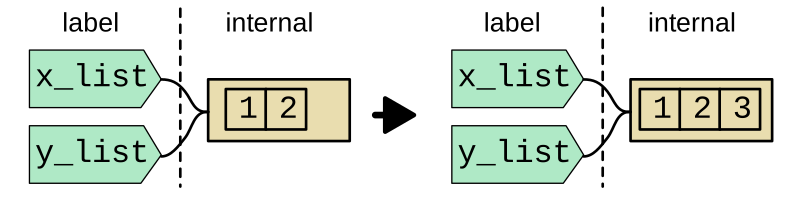
Unlike the “primitive” data structures (namely, int, float, str, bool, None) we saw in the previous sections, the Python list is mutable. This means that its content can change in the absence of reassignment. An important consequence is that when multiple variables reference the same internal object, a change in the internal object affects all references. An example:
x_list = [1, 2]
y_list = x_list
x_list.append(3)
y_list
[1, 2, 3]
In pictures, the above can be illustrated as:
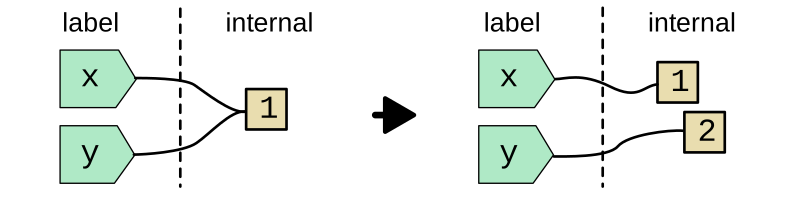
In contrast, if a variable references an integer, there is no way to change the corresponding internal object. The only thing you can do is to reassign the variable to a different object. Thus, x and y remains independent in the following:
x = 1
y = x
x = 2
y
1
Again in picture:
To avoid confusion, it is often a good practice to avoid multiple references to the same internal object, regardless of whether the object is mutable or not.
Note: functions versus methods#
A function is invoked by its name, followed by the parentheses within which the arguments to the function is supplied. The abs() function is an example:
abs(-5)
5
In contrast, a method is invoked from an object using a ., followed by the method name. In general, a method has access to the data in the calling object. An example is the .append() method, which returns nothing but modify the calling object in-place:
x = [1, 3, 4]
x.append(5)
x
[1, 3, 4, 5]
There are, however, methods that return values. An example is the .index() method of list, which returns the index for which a value is found:
x = [1, 3, 4]
x.index(3)
1